Identify an unfamiliar plant
Describe its leaves, flowers and growing habit to explore likely matches and basic care needs. If photo sharing is available in your chat, add a clear image for a closer look.
Ask a question
GOOD IDEAS TAKE ROOT HERE
Choose plants for your space, get help with a struggling plant, or find the hydrangeas on our sample nursery map. Your Garden Guide is here before, during and after a visit.
LIVE GARDEN CENTER DEMO · Fictional business
Plant help & nursery guidance · assistant
Ask about a plant, get help with a problem, or open the sample nursery map.
SEE THE CUSTOMER EXPERIENCE
Watch how a garden-center assistant can help shoppers explore plants and prepare service inquiries, then try the Garden Guide for yourself.
Try the Garden GuideMEADOWBROOK SAMPLE LOCATOR
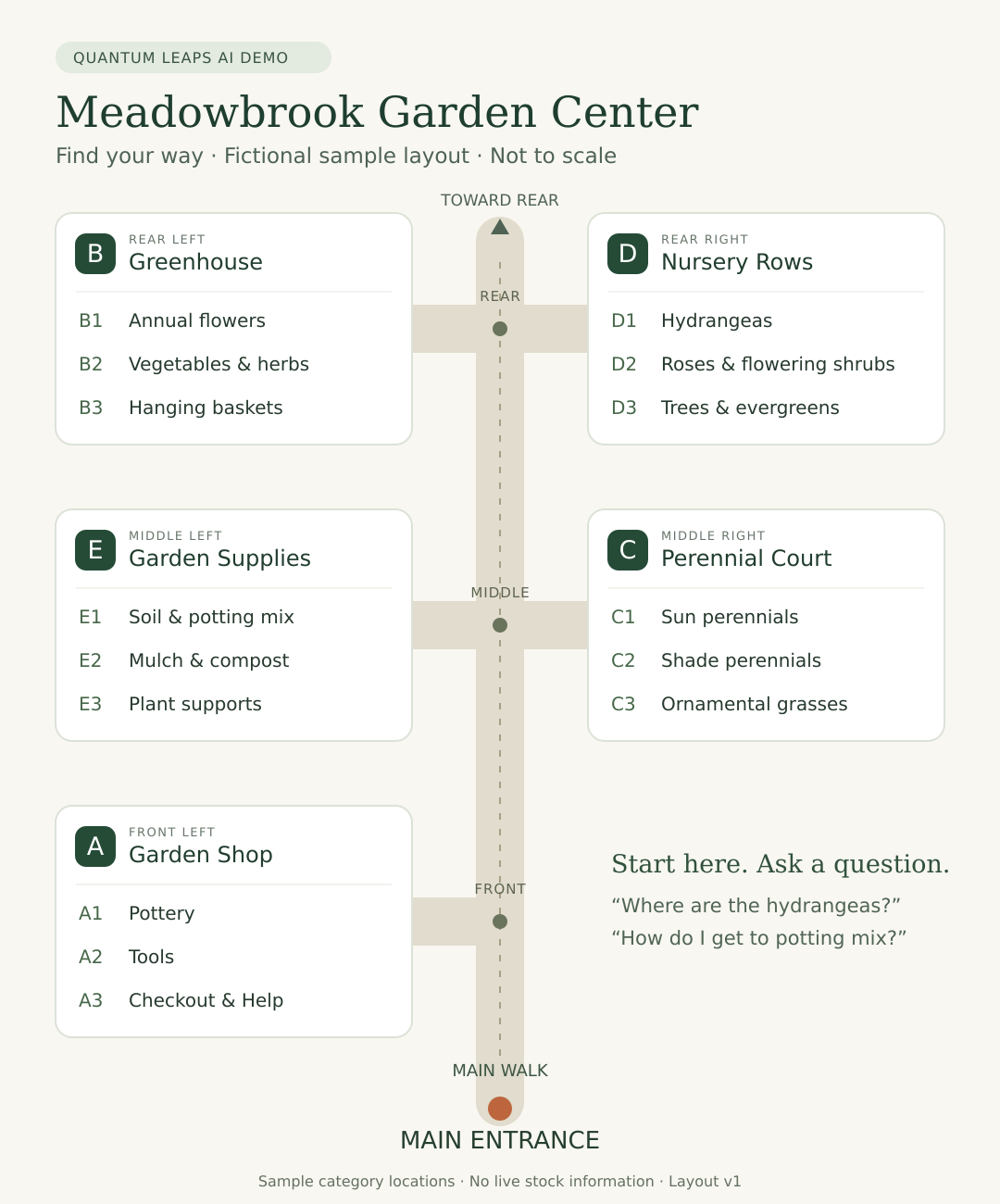
Explore five labeled areas, from the Garden Shop to the Nursery Rows. Start at the entrance or ask for directions from another department.
Meadowbrook is fictional. This sample layout shows how an assistant can guide shoppers using a garden center’s own approved locations. It does not show live inventory.
TRY THE LIVE ASSISTANT
Choose a question, copy it and paste it into the Garden Guide's chat box above—or ask about a project of your own.
How we can help
From an unfamiliar leaf to a planter that needs attention, ask a practical question and get a useful starting point. Explore the sample locator, plant recommendations, material estimates and project ideas.
Describe its leaves, flowers and growing habit to explore likely matches and basic care needs. If photo sharing is available in your chat, add a clear image for a closer look.
Ask a questionYellow leaves, wilting, spots or a white coating? Describe what you see to explore likely causes, practical care steps and when to ask garden-center staff for a closer look.
Ask a questionAsk where to find hydrangeas, potting mix or checkout. Open the Meadowbrook sample map and explore directions using its labeled departments.
Ask a questionExplore ideas for sun or shade, containers or garden beds. Consider room to grow, soil conditions and maintenance before putting together your plant list.
Ask a questionEstimate mulch, soil or stone from your measurements. Understand the volume you may need, then confirm products, pricing and delivery with the garden center.
Ask a questionDescribe a front-yard refresh, a new planting bed or a seasonal container. Turn your ideas into a clearer starting point for a conversation with the team.
Ask a questionHELPFUL BEFORE, DURING AND AFTER THE VISIT
Let customers reach your knowledge wherever a gardening question comes up: planning at home, browsing in the nursery or caring for plants after the visit.
Embed the assistant on your website or share a branded page like this one. Customers can open it on a phone, tablet or computer, without downloading an app.
Connect social posts, Facebook ads, Instagram profile links and seasonal email campaigns to a useful conversation about plants, products and projects.
Put your branded QR code on plant tags, bench signs, product displays, checkout cards and workshop handouts. Shoppers can ask about a plant, find a department and open the nursery map while exploring the store.
Add the QR code to care sheets, receipts, delivery paperwork and printed flyers. Customers can return for identification, watering guidance or help with a struggling plant after they get home.
GARDEN CENTERS & NURSERIES · CUSTOMER & TEAM SUPPORT
Choose a customer assistant, a staff assistant, or both. Each is built around the information, people, and procedures you approve.
CUSTOMER ASSISTANT
Recommend and help identify plants, explain likely plant problems and care steps, and guide shoppers to departments with a nursery map. Help estimate materials and prepare useful project inquiries.
Discuss customer support →STAFF & OPERATIONS ASSISTANT
Help seasonal hires learn plant names and department locations. Give the team plant-care references, approved procedures, and a way to report damaged plants, unanswered questions and daily issues.
Discuss staff support →Explore fictional training procedures, save a sample report, and review your manager briefing. Live staff assistant chat and email delivery are not connected yet.
Learn plant names, department locations, care references, customer-service standards, and opening routines.
Find approved returns, receiving, labeling, and care procedures without repeatedly interrupting the manager.
Collect damaged-stock reports, display issues, customer follow-ups, and recurring training questions.
SHIFT NOTES & MANAGER SUMMARIES
STAFF TRAINING & DAILY QUESTIONS
STAFF WORKFLOW EXAMPLE
This staff example uses prepared text. The live chat on this page demonstrates customer support; it does not run the staff-reporting workflow below.
A real assistant uses your approved procedures and directs unresolved questions to the right person.
Approved plant and product references, plant-health guidance, a maintained nursery layout, care routines, seasonal-hire materials, receiving and returns procedures, and department contacts.
A protected employee link can open from a phone, shared tablet, or workplace QR code. Customer and internal knowledge are kept separate. Report collection, manager briefings, and notifications are configured and tested when included in your scope.
YOUR BUSINESS. YOUR ASSISTANT.
Your branding, approved business knowledge, and the workflows you choose. Start with customer guidance, internal staff support, or a combined engagement.
BUILT TO BE SHARED
The GC mark identifies the garden-center demo. The same link and QR code can bring shoppers to this page from a plant tag, a social post or a care card they take home.

The GC mark identifies the garden-center page. Use the same link and QR code across your online and printed materials.
https://quantumleapsai.com/demos/garden-centerMeadowbrook Garden Center is a fictional business, and its imagery and nursery layout are illustrative. Quantum Leaps operates this demonstration and receives any details you choose to submit. Plant suggestions and material estimates are starting points; live inventory, prices and delivery availability are not connected. No real garden center is contacted, and no order, delivery or appointment is created. Use sample details to try the form. The staff illustration on this page uses prepared text. The separate staff demo saves fictional reports in your own demo session, without sending emails. Privacy details.